

Most UK businesses have no idea who is visiting their website. Website visitor IP tracking changes that, turning anonymous traffic into identifiable company names you can act on. This guide covers everything you need to know, from how the technology works, to how Google Analytics doesn’t help, to how it fits within UK GDPR – so you can make an informed decision about whether utilising IP addresses for visitor identification belongs in your sales and marketing strategy.
What Is Website Visitor IP Tracking?
What is an IP address and what does it reveal?
Every device that connects to the internet is assigned an IP address. Think of it as a postal address for your internet connection. When someone visits your website, their device sends a request to your web server, and that request includes the IP address of the connection being used.
What an IP address reveals depends on the type of connection. For most home broadband users, an IP address is assigned dynamically by an internet service provider and changes regularly. It tells you very little beyond the approximate region and the name of the provider.
For businesses, the picture is often different. Many companies use static IP addresses, meaning the same address is consistently associated with their network. This makes it possible, in many cases, to link an IP address back to the organisation that owns or uses it.
These two images show the same visitor to a website – the first shows their IP address. The second shows how that same IP address has been linked to a business name, and also how that visitor navigated page by page through the website.
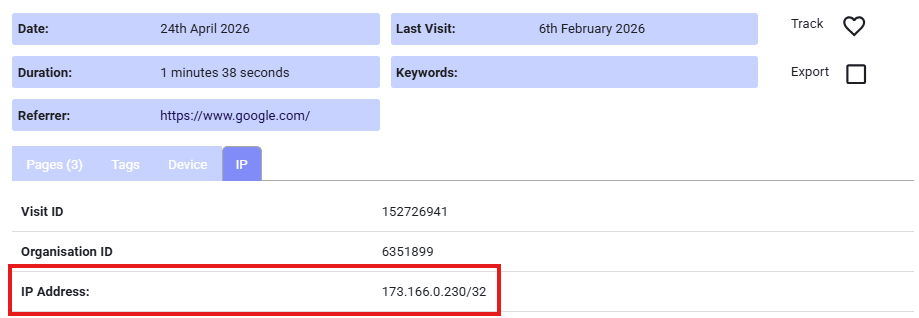
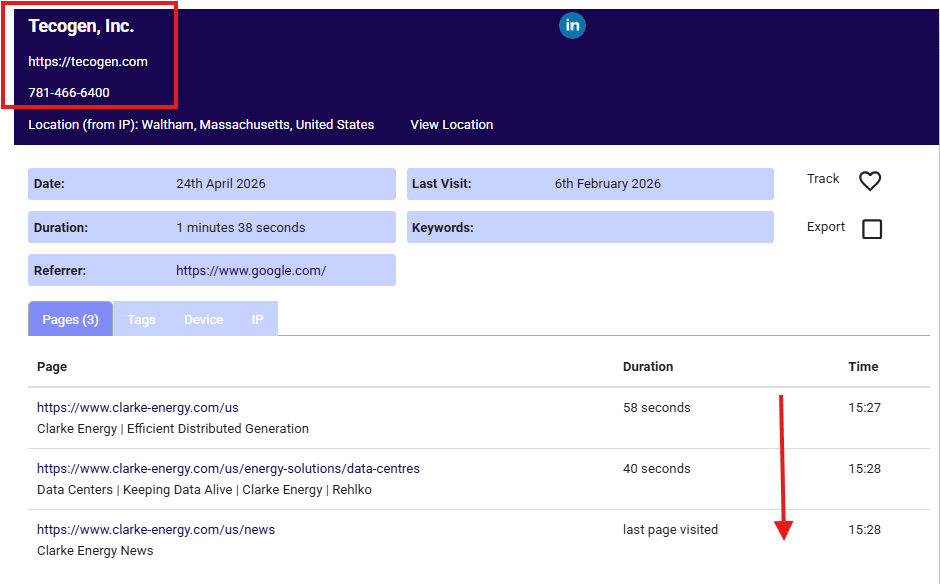
What an IP address does not reveal is the identity of the individual sitting at the keyboard. It is a network identifier, not a personal one.
How does IP tracking work and what is reverse IP lookup?
When a visitor lands on your website, your server logs their IP address as part of the standard request process. Website visitor IP tracking takes that logged address and runs it through a process called reverse IP lookup.
Reverse IP lookup works by cross-referencing the IP address against databases that map addresses to the organisations registered to use them. These databases are maintained by regional internet registries and supplemented by commercial data providers who enrich the records with company information such as business name, sector, and location.
The result is that an anonymous visit from an IP address can, in some cases, be matched to a named company. That company-level identification is the core output of IP tracking.
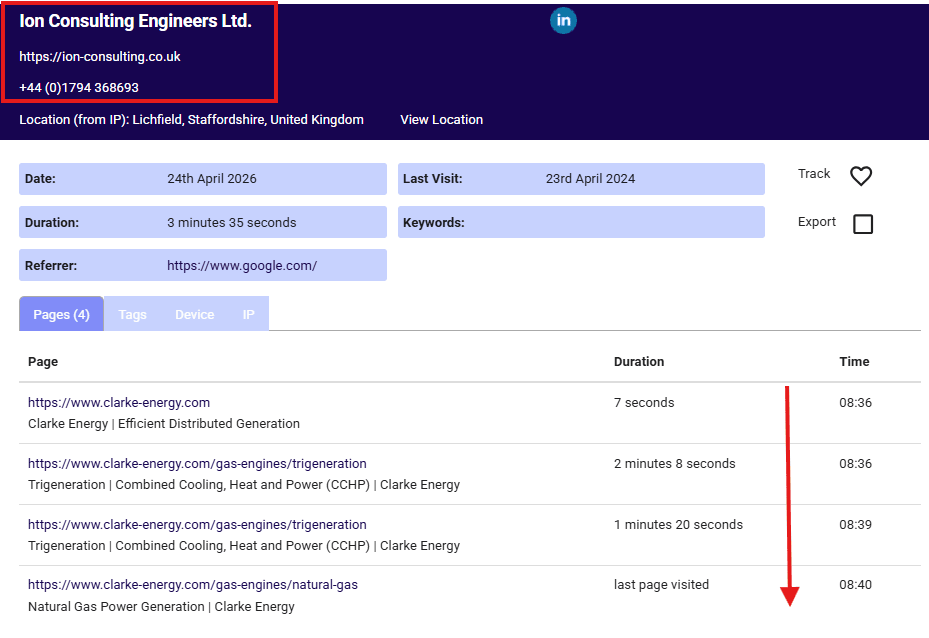
The process is automated and happens in near real time. A tracking script placed on your website captures the IP address, the data is looked up, and the result is shown in a dashboard or sent to your CRM. Here’s an example of a company that has been identified by their IP address (plus the pages they looked at on the website):
Website visitor tracking vs web analytics: what is the difference?
Tools like Google Analytics tell you a great deal about behaviour on your website. You can see how many people visited, which pages they viewed, how long they stayed, and where they came from. What you cannot see is who those people are or which companies they represent – Google Analytics is not suitable for visitor identification, but can help give you insights into conversion rates and point you towards website content and digital marketing that you could be strengthening.
Website visitor IP address tracking fills a different gap. It is less concerned with aggregate behaviour and more focused on identifying the organisations behind the visits. The two approaches are complementary rather than competing.
Web analytics answers the question: what is the visitor activity happening on my website?
IP tracking answers the question: who are my website visitors?
Used together, they give you a much fuller picture of your audience and how they are engaging with your content.
What Can You See With IP Tracking?
How IP address tracking identifies website visitors
The identification process relies on matching a visitor’s IP address to a company record. When a business employee visits your website from their office network or a corporate VPN, the IP address associated with that connection may be registered to their employer.
IP tracking software cross-references that address against enriched databases to unveil details about your web visitors, such as:
- Company name
- Industry or sector
- Approximate location, typically at city or regional level
- Company size, where data is available
- Pages visited and time spent on each
- Number of visits and visit frequency
Using such software gives your sales and marketing teams a starting point. You know a company has been on your website, what they looked at, and how often they have returned.
Types of website visitor tracking
There are broadly two approaches to tracking website visitors, and they work differently.
IP-based tracking identifies visitors at the network level using the IP address of the connection. No consent from the visitor is required for the tracking itself, though UK GDPR obligations still apply to how you handle and use the data. This approach works best for identifying business visitors on corporate networks.
Cookie-based tracking places a small file on the web visitor’s device to recognise them across sessions and, in some cases, across websites. This requires explicit consent under UK law and is more commonly associated with advertising and retargeting platforms.
Some visitor tracking tools combine both methods to increase identification rates, using IP lookup as the primary mechanism and supplementing it with other signals where available.
Why so much web visitors traffic remains unidentified
Even with a well-configured IP tracking setup, a significant proportion of your traffic will not be identified. This is not a flaw in the technology. It reflects the reality of how people connect to the internet.
Several factors limit visitor identification rates:
- Home workers connecting via residential broadband, where the IP address is registered to an ISP rather than an employer
- Mobile devices using carrier networks, which are similarly registered to the network provider
- VPN usage, which masks the originating IP address
- Visitors from small businesses or sole traders whose IP addresses are not registered to a named company
- Shared office spaces and co-working environments where multiple businesses use the same network
A realistic expectation for most B2B websites is that a minority of total traffic will be identifiable at company level. The value lies not in identifying everyone, but in identifying the right web visitors – the companies that match your target market and are actively researching what you offer.
What Can’t You See With IP Tracking?
Identifying individual people, including contact details
IP tracking identifies the company associated with a network connection. It does not identify the individual person who made the visit. Visitor identification will not give you a name, job title, email address, or phone number as a direct output of the IP lookup process.
This distinction matters both practically and legally. Practically, because you need to do additional work to connect a company visit to a specific contact. Legally, because identifying named individuals from IP addresses without consent would raise serious concerns under UK GDPR.
Some visitor tracking platforms supplement their IP data with contact databases, allowing you to see a list of people who work at the identified company. This is a separate data layer, not a product of the IP lookup itself, and it carries its own compliance considerations that we cover later in this guide.
The bottom line is straightforward: if someone visits your website from their home broadband connection, you will not know who they are or which company they work for. If they visit from a corporate network, you may identify the company, but not the individual. For a broader look at what any UK website can see about an anonymous visitor, beyond IP-based company matching, see our website tracking and privacy guide.”
Identifying the exact location of website visitors
IP tracking cannot tell you the precise physical address of a visitor. The location data shown by IP lookup is approximate and is typically accurate to city or regional level at best.
Searches for things like “ip tracker exact location” or “how to find someones exact location with ip address” reflect a common misconception. IP geolocation is not a precise tool. The registered location of an IP address may reflect where a company’s IT infrastructure is hosted rather than where the employee is physically sitting. For example, a business headquartered in Manchester may have IP addresses registered to a data centre in London.
For UK businesses using this data, location information should be treated as indicative rather than definitive. It can help you understand the broad geography of your audience, but it should not be relied upon for precise location targeting.
If your interest is in identifying the precise location of your website visitors then you can find out more in our guide on how to see who is visiting your website, which includes identifying an exact location via geolocation (without using IP addresses).
Benefits of Website Visitor IP Tracking for Businesses
Why businesses need IP tracking
Most B2B buying journeys begin with research, and most of that research happens anonymously. A potential customer might visit your website several times, read your case studies, compare your pricing page against a competitor, and then leave without making contact. Without IP tracking, you can’t see the company name and so that entire sequence of intent signals is invisible to you.
This matters because the companies doing that research are often your best prospects. They have already found you. They are already interested. The problem is you do not know they exist.
IP tracking gives your sales and marketing teams visibility into that hidden activity. It turns a passive website into an active source of prospect intelligence.
For UK businesses in sectors such as professional services, technology, manufacturing, and business-to-business services, where sales cycles are longer and relationships matter, this kind of early visibility can make a meaningful difference to pipeline development.
Capture hidden demand and dark funnel activity
The dark funnel refers to the research and evaluation activity that happens before a buyer makes contact with a supplier. It includes website visits, content consumption, peer conversations, and review site browsing, most of which leaves no trace in a CRM or lead form.
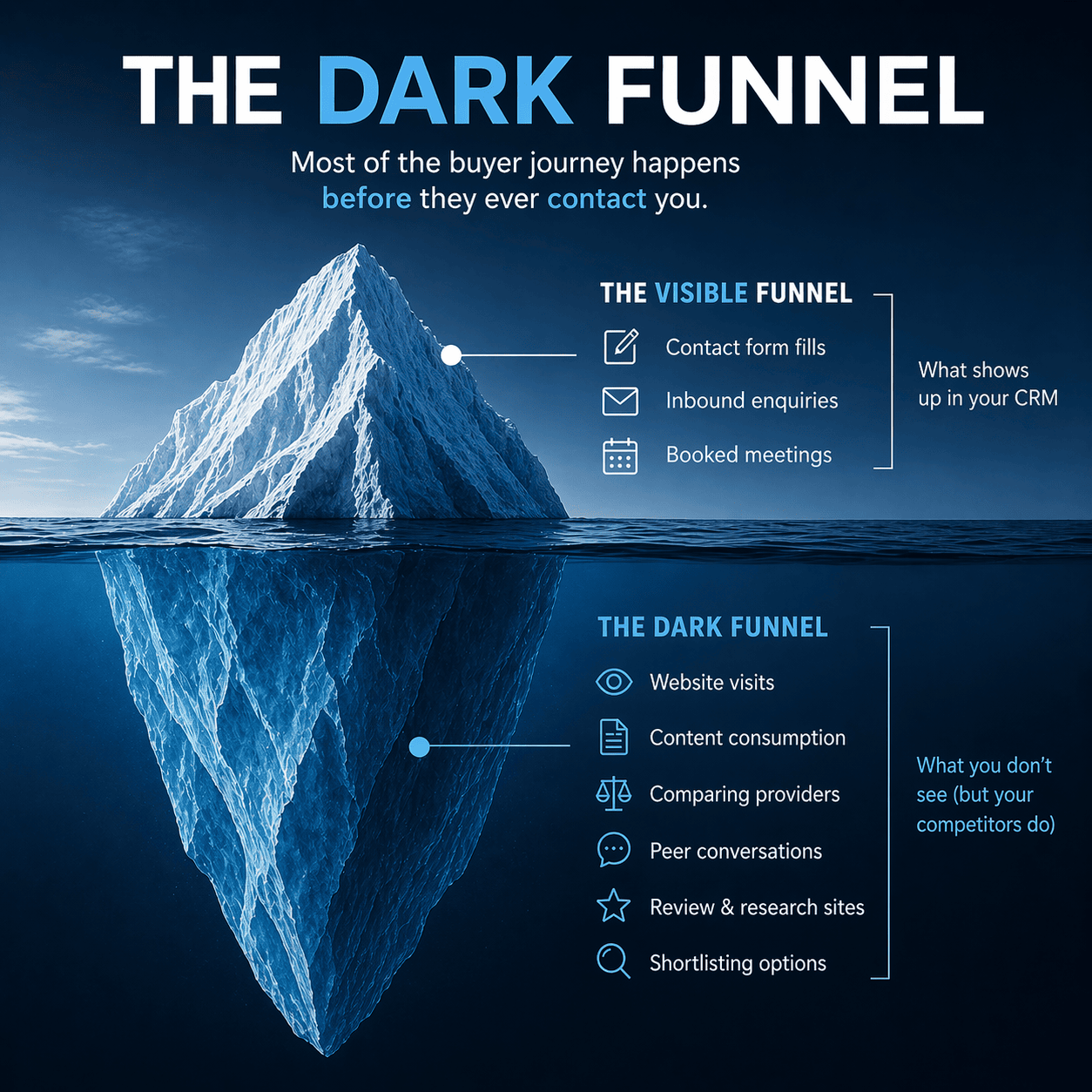
Tracking website visitors’ IP addresses gives you a window into part of that dark funnel. When a company visits your website repeatedly over a period of weeks, that pattern of behaviour is a signal worth acting on, even if they have never filled in a form or sent an enquiry.
Sales teams who monitor this data can prioritise outreach to companies that are already showing interest, rather than working from cold lists with no prior engagement. That shift in approach tends to produce better conversations, because the outreach is timely and relevant.
Revenue impact of visitor tracking and identification
The revenue case for IP tracking rests on a simple observation: most website traffic never converts through a form or a direct enquiry. If your website converts even a small percentage of visitors into leads through conventional means, the majority of your traffic is leaving without any commercial outcome.
IP tracking does not convert those visitors automatically. What it does is give you the information you need to follow up with companies that have demonstrated interest. Whether that follow-up takes the form of a targeted sales call, a personalised email sequence, or a retargeting campaign, the starting point is knowing who was there.
For businesses where a single new client relationship is worth thousands of pounds, identifying even a handful of previously anonymous visitors each month can justify the investment in tracking software many times over.
Practical Uses for Website Visitor IP Address Tracking
How to use IP tracking for lead generation
The most direct application of IP tracking is lead generation. Instead of waiting for visitors to raise their hand through a contact form, you can proactively identify companies that have visited and treat them as warm prospects.
A practical lead generation workflow using IP tracking might look like this:
- Review your website visitor tracking dashboard daily or weekly to see which companies have visited
- Filter for companies that match your ideal customer profile by size, sector, or location
- Check which pages they visited to understand what they were researching
- Cross-reference with your CRM to see if the company is already known to you
- Assign the company to a sales person for outreach, with the visit data as context
This approach means your lead generation activity is grounded in demonstrated interest rather than guesswork.
Strategies for using IP tracking in sales
For sales teams, the value of knowing how to track IP addresses that visit your website lies in timing and context. Reaching out to a company shortly after they have visited your website, and referencing the kind of content they engaged with, is a very different conversation from a cold call with no prior connection.
Practical sales strategies include:
- Setting up alerts for high-value target accounts so that sales reps are notified when a named company visits
- Using visit frequency data to identify companies that are in an active research phase
- Reviewing page-level data before a sales call to understand what the prospect has been looking at
- Using repeat visit patterns to time follow-up calls or emails more precisely
The goal is not to tell a prospect that you have been watching them. It is to use the data internally to make your outreach more relevant and better timed.
Strategies for using IP tracking in marketing
Marketing teams can use visitor data to sharpen their understanding of which content and campaigns are attracting the right kinds of companies. If your tracking data shows that a particular blog post or landing page is consistently visited by companies in your target sector, that is useful feedback for your content strategy.
Other marketing applications include:
- Identifying which traffic sources are bringing in companies that match your ideal customer
- Spotting companies that visit repeatedly but never convert, and testing different content or offers to engage them
- Using company-level visit data to inform the topics and formats of future content
- Feeding identified companies into retargeting audiences to maintain visibility after they leave your site
Supercharge your ABM strategy and target ads with IP tracking
Account-based marketing (ABM) relies on knowing which companies you want to reach and then directing your marketing activity specifically at those accounts. IP tracking supports this in two ways.
First, it helps you build and validate your target account list. If companies that match your ideal customer profile are already visiting your website, that is evidence that your content and positioning are resonating with the right audience. You can use that data to refine your account list with confidence.
Second, it allows you to use visit behaviour as a trigger for account-specific activity. For example, a company that visits your pricing page three times in a fortnight is telling you something. That signal can be used to trigger a targeted ad campaign, a direct mail piece, or a personalised outreach sequence aimed specifically at that account.
For UK B2B businesses running paid advertising, feeding identified company data into platforms that support company-level targeting can improve the efficiency of ad spend by concentrating budget on accounts that are already showing interest.
How to Identify Your Ideal B2B Website Visitors
Identifying your ideal B2B customer from visitor data
Before you can use IP tracking to find the right companies, you need a clear picture of what the right company looks like. This is your ideal customer profile (ICP), and it typically includes factors such as:
- Industry or sector
- Company size, measured by headcount or turnover
- Geography, particularly relevant for UK businesses targeting specific regions
- The kinds of problems or challenges they are likely to be trying to solve
Once you have that profile defined, you can use it as a filter when reviewing your visitor tracking data. Rather than treating every identified company as a lead, you focus your attention on the ones that genuinely fit.
How to use IP tracking to find ideal customers
With your ideal customer profile in place, the process of using IP tracking to find matching visitors becomes more structured. Most visitor tracking platforms start with adding tracker code to your website, which then allows you to filter or segment your visitor data by attributes such as company size or sector, making it easier to surface the companies that matter most.
A useful approach is to review your visitor data over a rolling period, perhaps the past 30 or 60 days, and look for patterns. Are certain types of companies visiting more frequently? Are there sectors you had not considered that are showing consistent interest? Are companies from a particular region engaging with specific content?
This kind of analysis can both validate your existing ideal customer profile and surface new segments worth exploring. The data your website is already generating can inform your targeting strategy, not just your outreach activity.
How accurate is B2B website visitor identification?
Accuracy varies, and it is worth having full clarity on this. The quality of IP-to-company matching depends on the databases used by your B2B IP tracking platform, the type of network the visitor is connecting from, and how well maintained the underlying registration data is.
For large and mid-sized businesses connecting from corporate networks, identification rates tend to be more reliable. For smaller businesses, sole traders, or anyone connecting via a residential or mobile connection, identification is far less likely.
Even when a company is identified, the associated data, such as sector classification or company size, may not always be current or precise. Treat the data as a useful starting point for research rather than a definitive record.
The practical implication is that you should verify identified companies before investing significant sales effort. A quick check against Companies House or LinkedIn takes moments and confirms whether the identified company is a genuine fit before you pick up the phone or send an email/connection request.
IP Tracking, GDPR Compliance and Privacy in the UK
IP tracking and privacy: GDPR compliance
UK GDPR applies to the processing of personal data. Whether an IP address constitutes personal data under UK GDPR depends on context. If an IP address can be linked to an identifiable individual, either directly or in combination with other data, it is likely to be treated as personal data.
For business IP addresses linked to a company rather than an individual, the position is more nuanced. Processing company-level data does not carry the same obligations as processing personal data (because the web visitors can’t usually be identified), but the line between the two is not always clear, particularly where a sole trader or small partnership is involved and the IP address could effectively identify a named person.
UK businesses using IP tracking should not assume that because they are identifying companies rather than individuals, GDPR does not apply. The safest approach is to treat the activity as falling within the scope of UK GDPR and to ensure your privacy notice reflects how you collect and use visitor data.
We are not providing legal advice here. If you are uncertain about your obligations, seek guidance from a qualified data protection professional or your organisation’s Data Protection Officer.
Legal and compliance considerations for tracking and identification
Beyond the question of whether IP tracking involves personal data, there are broader compliance considerations for UK businesses.
Key points to consider include:
- Your privacy notice should accurately describe the data you collect from website visitors, including IP addresses, and explain how that data is used
- If you are using the identified company data to make contact with individuals at those companies, you need a lawful basis for that processing under UK GDPR
- Legitimate interests is the basis most commonly relied upon for B2B prospecting, but it requires a genuine balancing exercise and is not a blanket exemption
- If your tracking platform stores data outside the UK or the European Economic Area, you need to ensure appropriate transfer safeguards are in place
The specifics of your situation will determine your obligations. This guide gives you a framework for thinking about the issues, not a substitute for professional advice.
What is the difference between IP tracking and cookies?
IP tracking and cookie-based tracking are distinct mechanisms, and the legal treatment of each differs.
IP tracking works at the network level. When a visitor arrives on your website, their IP address is captured as part of the standard server request. This happens without placing anything on the visitor’s device. Because no cookie or similar technology is being used, the requirement for prior consent under the UK’s Privacy and Electronic Communications Regulations does not apply to the IP capture itself.
Cookies, by contrast, are small files placed on a visitor’s device. Under UK law, non-essential cookies require the visitor’s informed consent before they are set. This is why cookie consent banners are a legal requirement for most UK websites.
The distinction matters because some businesses assume that IP tracking requires the same consent mechanism as cookies. For the IP capture itself, that is not the case. However, if your tracking platform uses cookies alongside IP lookup to improve identification rates, those cookies will need to be covered by your consent mechanism.
Data governance, opt-out, and privacy controls
Good data governance around IP tracking means being transparent about what you collect, having a clear purpose for collecting it, and not retaining data longer than necessary. In short, respecting privacy regulations.
Practical steps for UK businesses include:
- Updating your privacy notice to reference IP address collection and its purpose
- Ensuring your tracking platform vendor has a Data Processing Agreement in place with you
- Reviewing how long visitor data is retained and setting appropriate limits
- Providing a mechanism for companies or individuals who wish to opt out of being tracked, even if this is not strictly required for IP-level data
- Checking where your vendor stores and processes data, particularly if they are based outside the UK
Transparency is not just a legal obligation. It is also good practice for building trust with the businesses you are trying to reach. A clear, honest privacy notice signals that you take data seriously.
Top Website Visitor Tracking Tools
Key features of visitor tracking software
When evaluating a website visitor IP tracker, the features that matter most are those that directly support how your sales and marketing teams will use the data day to day.
There are many suppliers of software that tracks identifiable website visitors – here’s our guide to those that would be most useful for UK businesses.
Features worth assessing include:
- Identification rate of web visitors and database quality: how reliably does the tool identify companies from IP addresses, and how current is the underlying data?
- Firmographic enrichment: does the tool surface useful company attributes such as sector, size, and location alongside the identification?
- Page-level visit data: can you see which specific pages a company visited and for how long?
- Visit history and frequency: does the tool show repeat visits and patterns over time?
- Alerting and notifications: can you set up alerts when a target account or a company matching your criteria visits?
- CRM integration: does the tool connect with the sales and marketing platforms your team already uses?
- UK GDPR compliance features: does the vendor offer data processing agreements, data residency options, and opt-out mechanisms?
How to choose the right website visitor tracking tool
The right tool for your business depends on your team size, your sales process, and the volume of traffic your website receives. A small sales team with a focused target account list has different needs from a larger marketing operation running multiple campaigns simultaneously.
Questions to ask when evaluating options:
- Does the tool’s web visitors identification rate hold up for the types of companies in your target market?
- How easy is it for a non-technical user, such as a sales manager, to use the dashboard day to day?
- What does the onboarding process look like, and how quickly can your team get value from the data?
- Is there a free trial or low-commitment entry point that lets you test the tool against your actual traffic before committing?
- What are the contract terms, and are you locked in for a long period before you can assess whether it is working?
Where tools publish pricing, look for transparency around what is included at each tier and whether identification limits or CRM integrations are gated behind higher-cost plans.
Integration capabilities and ease of use
A visitor tracking tool that sits in isolation from your other systems creates extra work rather than reducing it. The most useful setups are those where identified company data flows directly into the tools your team already uses.
Common integrations to look for include connections with CRM platforms, email marketing tools, and advertising platforms that support company-level audience targeting. Some tools also offer webhook or API access for businesses with more custom requirements.
Ease of use matters as much as feature depth. A tool that requires significant technical knowledge to configure or interpret will not get used consistently. Look for platforms that surface the most important information clearly, without requiring your sales team to become data analysts to get value from it.
Frequently Asked Questions About Website Visitor IP Tracking
Can website visitor tracking identify individual people or just companies?
IP tracking identifies company names, not individuals. When a visitor arrives on your website from a corporate network, the IP address may be matched to the organisation that owns or uses that network. The name, job title, or contact details of the specific person who made the visit are not revealed by the IP lookup process.
Some tracking platforms supplement their IP data with contact databases, showing you a list of people employed at the identified company. This is a separate data layer with its own compliance considerations. It does not mean the tool has identified who specifically visited your site.
What is the difference between visitor tracking and Google Analytics?
Google Analytics is a visitor behaviour analytics tool, including overall website statistics. It tells you how many people visited your site, which pages they viewed, how they arrived, and how they behaved during their session. It does not tell you which companies those visitors work for.
Visitor tracking tools focus on company-level identification. They tell you which organisations have been on your site, what they looked at, and how often they have returned. They typically provide less granular behavioural data than a dedicated analytics platform but give you something Google Analytics cannot: a named company to follow up with.
Both Google Analytics and visitor tracking tools serve different purposes and work well alongside each other.
How do sales teams use website visitor tracking data effectively?
The most effective sales teams use visitor tracking data as a daily or weekly input to their prospecting activity. Rather than working exclusively from cold lists, they review which company names have visited recently, filter for those that match their target profile, and prioritise outreach accordingly.
The visit data also provides useful context for conversations. Knowing that a company has visited your case studies page or your pricing page before you call gives you a more informed starting point than a cold approach with no prior signal.
Consistency matters. Teams that build a regular habit of reviewing and acting on visitor data tend to get more from the tool than those who check it occasionally.
Do website visitor tracking tools work for remote employees?
This is one of the most common practical limitations of IP tracking. When an employee works from home and connects via their residential broadband, the IP address is registered to their internet service provider rather than their employer. In most cases, that visit will not be identified as coming from their company.
The same applies to employees using mobile data connections or personal VPNs.
IP tracking works most reliably when visitors connect from a corporate network, a business broadband connection registered to the company, or a corporate VPN that routes traffic through a business IP address. As remote and hybrid working has become more common across UK businesses, this limitation has become more significant, and it is one reason why identification rates vary considerably depending on your audience.
In summary
The core value of website visitor IP tracking comes down to visibility. Your website is already receiving visitor activity from companies that could become clients. The question is whether you have the means to identify them and act on that interest before they move on.
Three things are worth taking away from this guide.
- Set realistic expectations: IP tracking tools identify company names, not individuals, and the majority of your traffic will always remain anonymous.
- Treat the data as a starting point for research and outreach, not a finished lead.
- Make sure your use of the technology is reflected accurately in your privacy notice and sits within a clear UK GDPR framework.